This is the engineering AI stack employers expect you to know. Organized by what each tool replaces, with pricing and the use case that matters most.
The tools below are the ones AI-skilled engineering pros are using day-to-day at AI-native and AI-forward companies. We grouped them by what each layer does so you can pick one tool per layer instead of trying to learn all of them.
The bigger picture: If you're an engineer not yet shipping AI, the gap is widening by the week. The two-month investment to learn RAG, basic agent patterns, and one eval framework changes which jobs you can apply to. Engineers who ship one production AI feature, even small, become a different candidate.
The Stack
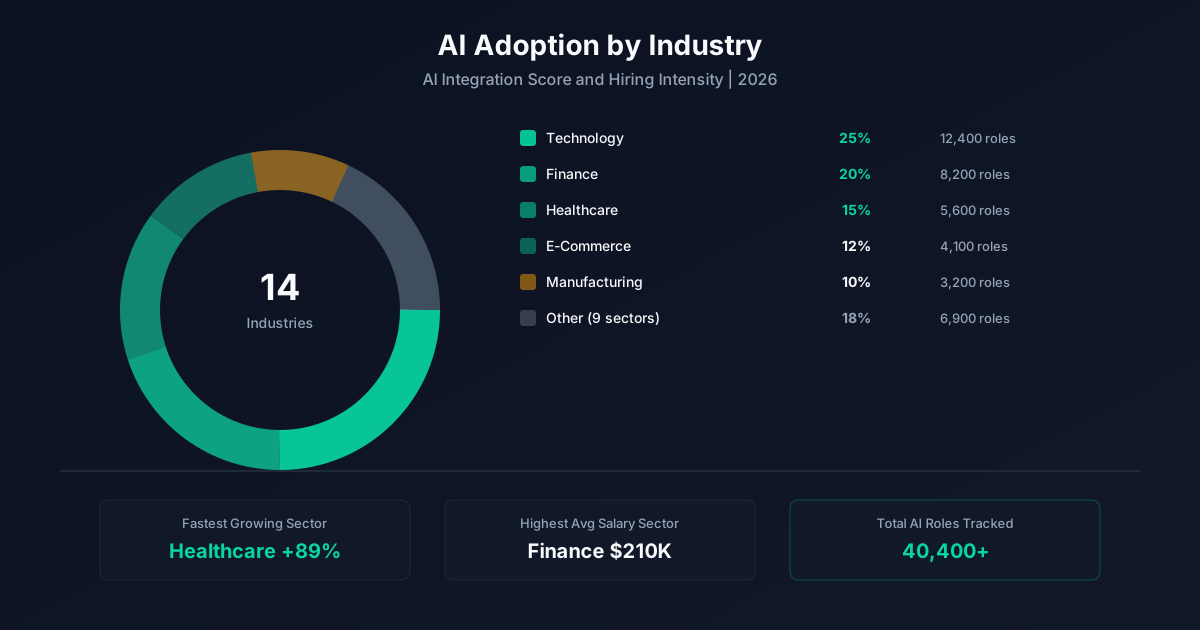
This is the engineering AI tool stack we see in real job postings and practitioner workflows. We organized it by category so you can see what each layer does, then picked the leaders in each. Pricing reflects publicly listed plans as of 2026.
Don't try to learn all of these. Pick one tool per category, get usefully fluent, then add adjacent tools as your work demands them. The skills you build with one platform mostly transfer.
AI Coding Assistants
VS Code fork with deep AI integration, agent mode, and codebase indexing
Best for: Engineers who want the most capable IDE
Anthropic's CLI-native coding agent with strong long-context performance
Best for: Engineers comfortable in the terminal
Inline completions, chat, and PR review inside GitHub
Best for: Teams already on GitHub Enterprise
Codeium's full IDE with multi-file edits
Best for: Teams wanting an alternative to Cursor
AI Frameworks (for building AI features)
Most-cited LLM orchestration framework, used in 12K+ live job postings
Best for: Engineers building RAG and agent systems
Data framework optimized for retrieval and indexing
Best for: RAG-heavy applications
TypeScript-first SDK for streaming and tool-use UIs
Best for: Frontend and full-stack JS teams
MLOps & Deployment
Serverless GPU compute and deployment
Best for: Teams shipping AI features without managing infra
Experiment tracking, evals, and model registry
Best for: Teams training or fine-tuning models
How To Choose
If you're an individual contributor learning on your own time: start with the cheapest or free tier in each category. ChatGPT, a tool with a generous free plan, and one specialized tool. Total spend stays under $50 a month.
If you're picking tools for your team: weigh integration first, capability second. The best tool that doesn't connect to your data is worth less than a B+ tool that lives where your work happens.
Once you've picked, read the matching skills page for what to learn first, or the 6-week curriculum for the sequenced plan.
A Worked Example
Here's the same stack at work in a real engineering workflow:
A senior backend engineer at a fintech rebuilt the company's customer support tooling around an internal RAG system over the help center, ticket history, and product docs. The system uses Claude with a custom retrieval layer and an eval framework that tests against 200 historical tickets weekly. Tier 1 deflection rose from 8% to 34% in a quarter. The engineer wrote up the architecture and eval design publicly, which led to a senior staff offer at an AI-native scale-up at +50% comp.
The pattern matters more than the specific tools or numbers. Documented work, measurable outcomes, and a story you can tell externally are the three things that move engineering pros from median to top quartile in 2026.
Putting It Together
Tools is one piece of the AI-for-engineering story. The full picture covers what AI is changing about the work (the risk page), the skills employers want (the skills page), the tools AI-fluent pros use (the tools page), what the work pays (the salary page), where the hiring is happening (the jobs page), the curriculum to close any gaps (the learn page), and the career path that connects them (the career page).
Most engineering pros end up reading three or four of these pages before they make a move, because the questions are connected. The skills you need depend on the role you're targeting; the salary band depends on the seniority and company type; the curriculum that gets you there depends on what you're starting from. The hub at /ai-for-coding/ ties the pieces together with the strategic synthesis: what's actually happening in engineering, what to do about it, and how to think about your next move.
If you're early in the process, start with the risk page for the honest read on what AI is and isn't changing in engineering. If you're closer to a job move, the jobs page and career page are the highest-impact reads. If you're trying to grow inside your current role, the learn page is the practical sequence.
Common Questions
The questions below come from engineering pros at every stage, junior to executive. If you don't see yours, the related pages link out to the deeper coverage on each topic.
There isn't one. The right answer depends on your existing stack, budget, and what you're trying to automate. Most engineering pros end up running 2-3 AI tools, not one. Use the categories above to pick one tool per layer.
An individual can stay under $50/month using ChatGPT plus one specialized tool. A team usually lands at $50-150 per seat per month for the full stack. Heavy users at AI-forward companies can hit $300+ per seat.
Some are. Spreadsheets are losing share to AI-assisted analysis. Standalone copywriting tools are losing share to ChatGPT. The pattern is consolidation toward AI-native platforms that absorb adjacent functions.
No. The skills you build with one tool transfer to its replacement. Prompt design, workflow building, and eval thinking are platform-agnostic. The cost of waiting is higher than the cost of switching.
Yes. Pick the AI tool that maps to your most repetitive task. Run it in parallel with your normal workflow for a week. The compounding starts immediately.
Keep Going
The pages below cover the rest of the picture. Each one is a self-contained answer to a different long-tail question. Most engineering pros end up reading three or four before they apply somewhere or make their next move.
Methodology
Every number on this page comes from a continuously updated dataset of 22,351 weekly job postings across 42 roles and 14 industries. Salary figures are derived from postings that disclose compensation and weighted by seniority, location, and remote status. AI penetration percentages reflect the share of postings in each function that explicitly require or prefer AI skills. Premium calculations compare median compensation for postings tagged AI-skilled against postings in the same function and seniority without AI requirements. The dataset refreshes every Sunday; the snapshot used for this page is dated the week shown above.
Sources & notes. Source dataset: AI Pulse weekly job posting index (n=22,351). Salary disclosure rate: 6.4% of postings include compensation. Premium calculations require minimum n=20 postings per role-seniority cell. Updated weekly. For methodology questions, see the About page.
Last updated: 2026-10-08.
One email a week. AI adoption data, salary shifts, and the skills worth learning. No fluff.
Subscribe Free AI Pulse